• Products
  • Software evaluation
  • Downloads
  • Free utilities
  • Purchase
  • Silicon Vendors
  • Support
  • About us
  • Blog
  • Forum
  • Search
  • Jobs
  • Newsletter
  • Blog
  • Contact
  • Shop
  • Ozone - debugger and performance analyzer

    Ozone
    Debugger and performance analyzer

    Ozone is SEGGER's multi-platform debugger and performance analyzer for Arm- and RISC-V-based applications.

    Contact us
    Downloads
    Documentation
    SEGGER Ozone
    1. 1.Overview
    2. 2.Key features
      1. 2.1.Advanced debug experience
      2. 2.2.Performance analyzer
      3. 2.3.Any toolchain or IDE
      4. 2.4.Test and automation
    3. 3.How Ozone works
    4. 4.Efficient debugging
    5. 5.Target control and communication
    6. 6.RTOS and middleware support
    7. 7.System and performance analysis
    8. 8.Setup and test automation
    9. 9.Debug and trace probe support
    10. 10.System requirements
      1. 10.1.Operating systems
      2. 10.2.Hardware
    11. 11.Licensing
    12. 12.Latest news

    Overview

    A computer monitor displays a programming interface featuring multiple windows for debugging and analyzing code. Key components include a code editor on the left, a power consumption graph, and various system diagnostics and log data. The layout suggests an environment for performance tracking and firmware development.

    Ozone is a full-featured graphical stand-alone debugger for embedded applications. With Ozone, it is possible to debug any Arm- or RISC-V-based embedded application on C/C++/Rust source and assembly level. Ozone can load applications built with almost any toolchain or IDE, or debug the target's resident application without any source. It includes all well-known debug controls and information windows. While Ozone performs best with J-Link and J-Trace debug and trace probes, it is also available for use with third-party probes and simulators.

    More than just a debugger, Ozone provides comprehensive performance analysis tools, including instruction tracing, code profiling, and code coverage. This allows users to measure execution time, detect bottlenecks, track down inefficiencies and bugs, and analyze system behavior in the event of crashes or other technical issues.

    Key features

    Abstract representation of a circuit board with intricate lines and patterns. The image features a microprocessor prominently, set against a dark background, emphasizing the technology theme. The overall tone is sleek and modern, suggesting advancements in electronics and computing.

    Advanced debug experience

    Ozone is an intuitive full-featured graphical debugger. It provides all common debug tools, such as a source window, memory and register windows, allows execution control etc. In addition it adds numerous tools for validation, advanced debugging and to analyze performance.

    Abstract representation of a circuit board with intricate lines and patterns. The image features a microprocessor prominently, set against a dark background, emphasizing the technology theme. The overall tone is sleek and modern, suggesting advancements in electronics and computing.

    Performance analyzer

    Ozone turns raw trace data into actionable insights. Visual timelines, code profiling, and coverage reports help identify bottlenecks, optimize execution paths, and validate test completeness—ideal for high-reliability embedded systems.

    Abstract representation of a circuit board with intricate lines and patterns. The image features a microprocessor prominently, set against a dark background, emphasizing the technology theme. The overall tone is sleek and modern, suggesting advancements in electronics and computing.

    Any toolchain or IDE

    Ozone supports any toolchain, including Embedded Studio, GCC-based IDEs, Clang/LLVM, IAR, the Arm Compiler, and others. This ensures maximum flexibility: load applications from your preferred build environment or debug directly on the device without rebuilding.

    Abstract representation of a circuit board with intricate lines and patterns. The image features a microprocessor prominently, set against a dark background, emphasizing the technology theme. The overall tone is sleek and modern, suggesting advancements in electronics and computing.

    Test and automation

    The automation interface grants full access to the console window, allowing to issue commands and monitor the output. Whatever can be done in a manual debug session can also be done via the automation interface in an automated environment. 

    How Ozone works

    Using Ozone starts with creating the firmware with a toolchain of the user's choice. The user then starts Ozone, selects the firmware image and the target microcontroller or microprocessor to start debugging immediately. Ozone establishes the connection to the debug probe and provides full control over the target system. When changes are made to the firmware image, a running Ozone instance detects the update and suggests using the modified image.

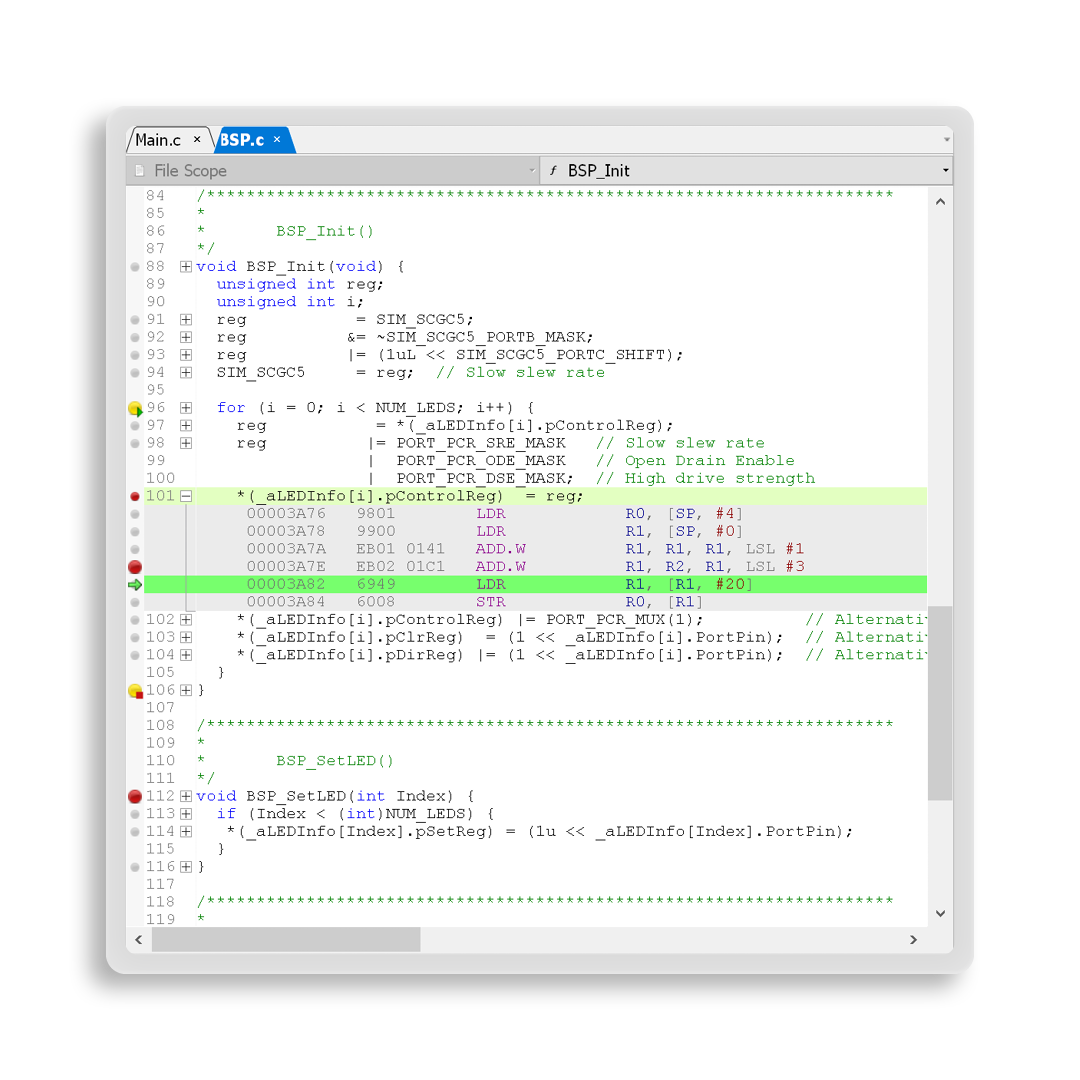
    Users who want to quickly verify a simple code change can also use the built-in source editor to apply an immediate bug fix or perform a quick test.


    The image displays a portion of C programming code for initializing a Basic Software Platform (BSP). It includes function definitions, variable declarations, and memory instructions, focusing on setting up LED control registers and their configuration parameters.

    Efficient debugging

    Ozone assists developers with all common features of a modern debugger. This includes a full-fledged source code window including syntax-highlighting, as well as symbol and data windows and register and memory displays.  Ozone goes beyond typical debugging use cases to enable efficient and extensive debugging within a fully integrated user interface.
    More information


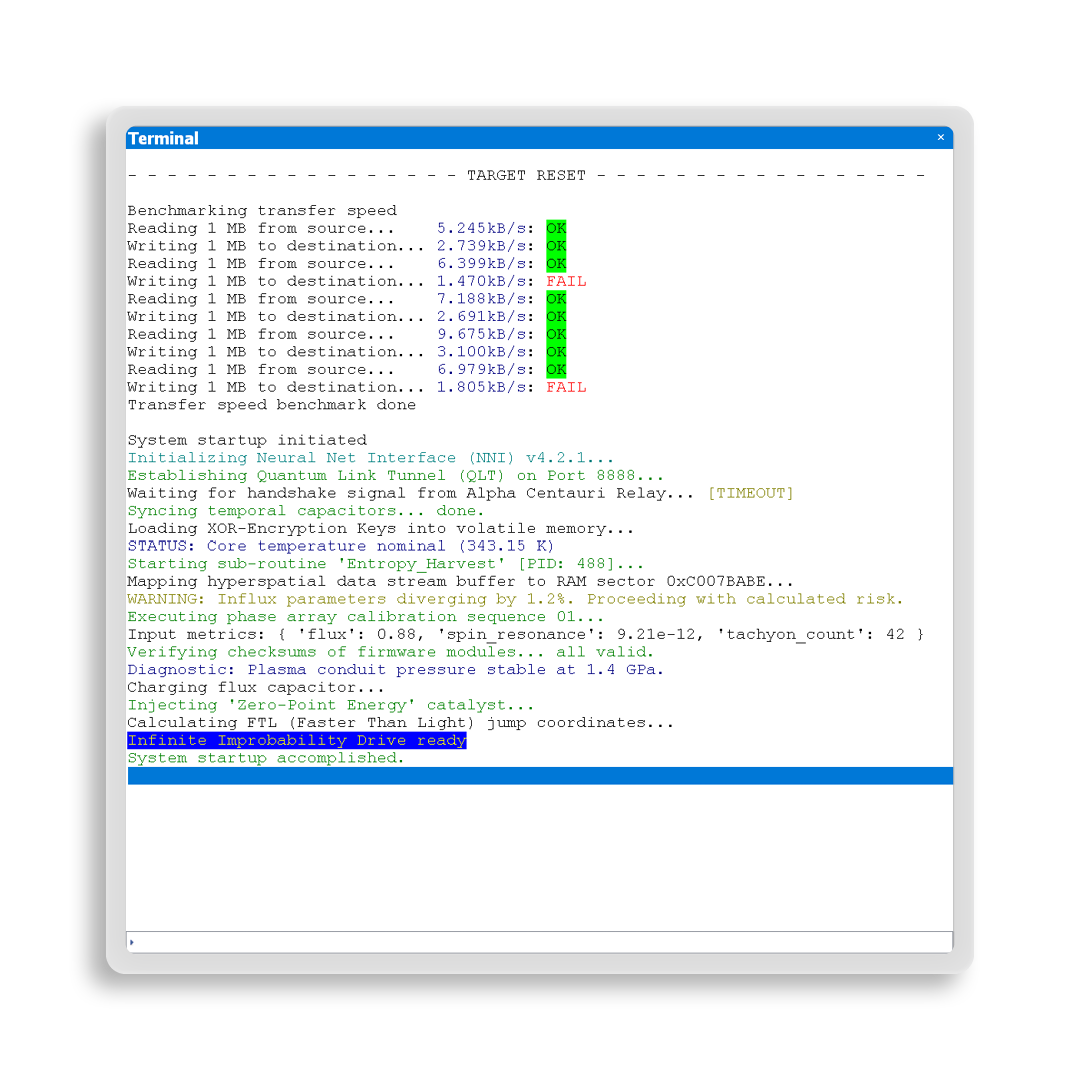
    A terminal interface displays a series of benchmark tests and a system startup process. It reports reading and writing transfer speeds, initialization of components, and warnings about parameter divergences. The final message indicates that the "Infinite Improbability Drive" is ready, with the system startup completed.

    Target control and communication

    Ozone provides full control over the target via the debug interface, which includes stepping through code, using breakpoints, and more. Additionally, Ozone enables communication with the device and logging of firmware output.

    More information


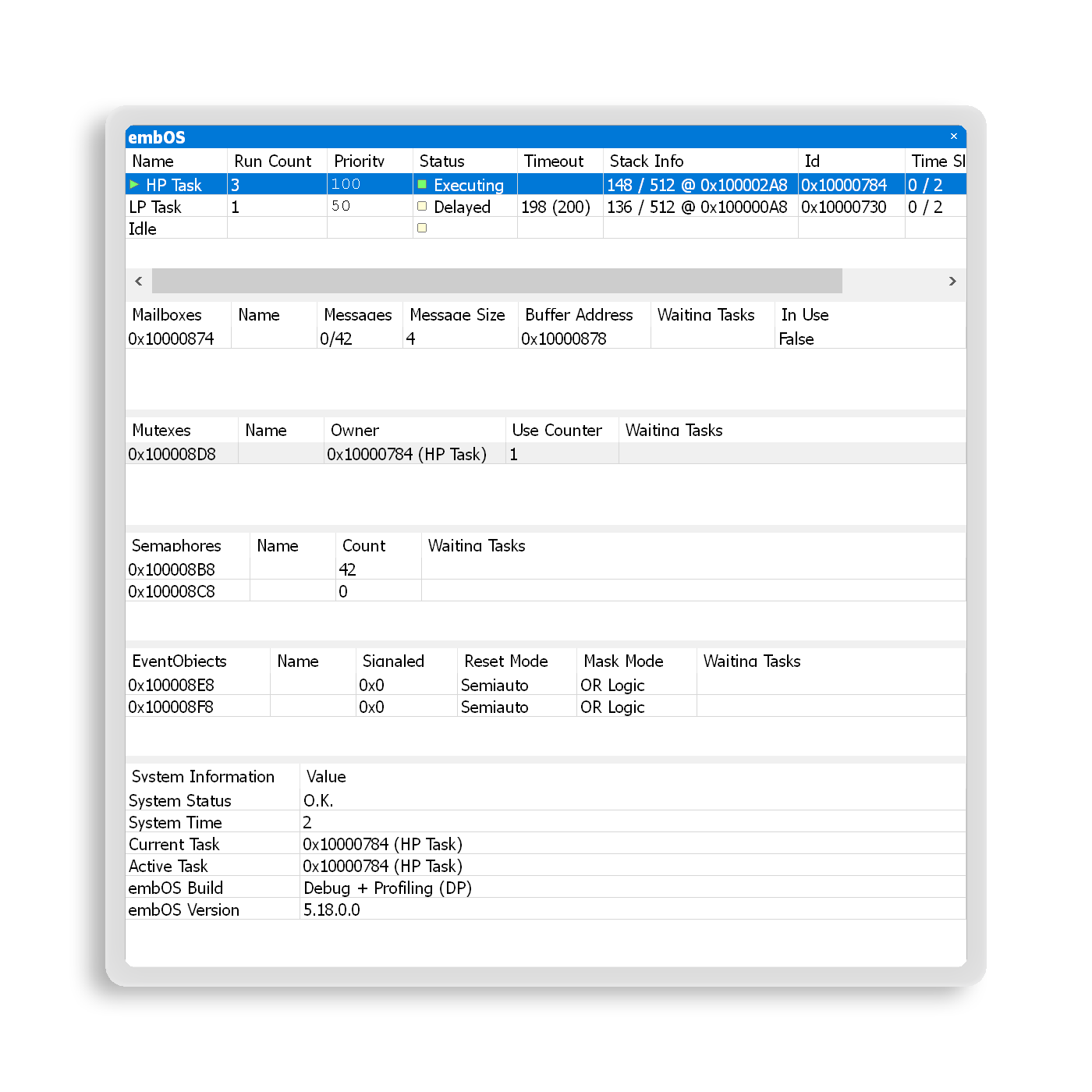
    A software interface display shows the status of tasks in an embedded operating system. It lists high-priority and low-priority tasks, their statuses (executing and ready), and details about various system resources such as mailboxes, queues, and memory pools, along with respective metrics.

    RTOS and middleware support

    Ozone offers debug tools designed to address the growing complexity of modern embedded systems. To gain better insight into the behavior of an RTOS and middleware, Ozone includes RTOS plug-ins and a SmartView interface for middleware.

    More information


    System and performance analysis

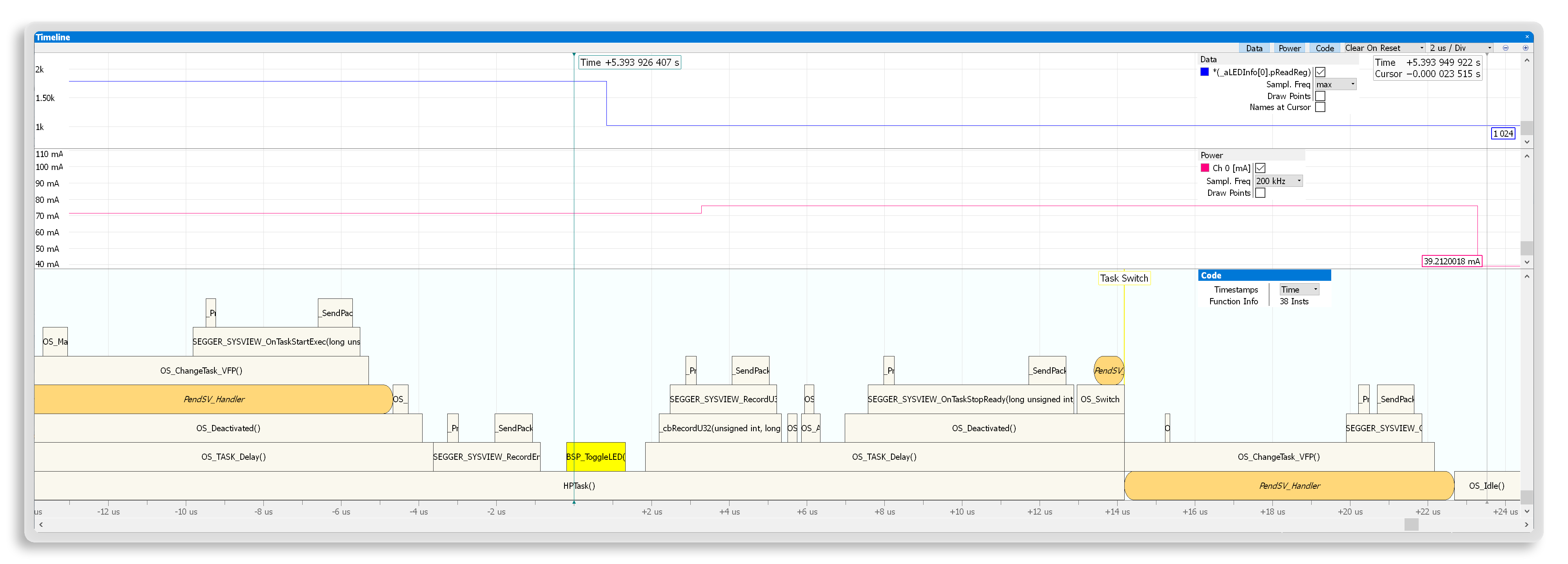
    Ozone helps developers understand how their embedded systems perform. It collects a wide range of valuable information, such as instruction traces, power consumption, and data samples. Its performance analysis features make it easier to understand and optimize a system.
    More information

    Graph displaying a timeline of task execution in a system. The y-axis represents current in milliamperes, while various tasks are plotted over time, showing events such as task switches and function executions. Notable points include 'BSP_ToggleLED()' and task delays.

    Setup and test automation

    For automation tasks, Ozone users can add scripts to a project or run them directly in the console. By utilizing scripts, users can achieve consistent and comprehensive verification and debug setups, as well as automated tests that do not require user interaction. 

    These scripts can perform almost all actions available through Ozone's graphical user interface. They can be used to configure the GUI and automate the debug work flow. Users also have access to event handlers, so they can create triggering events for specific actions within a script. Events include downloads, reset, halt, go, breakpoints. Users can set triggers before, after, or on the event itself.


    Debug and trace probe support

    J-Trace


    Source view with syntax highlighting

    Debug information windows

    Terminal communication

    Full target control

    RTOS awareness

    SmartView for middleware

    Data sampling

    Real Time Transfer (RTT)

    Instruction trace

    Unlimited Flash Breakpoints

    Ozone license included

    Power profiling

    Buy J-Trace

    J-Link


    Source view with syntax highlighting

    Debug information windows

    Terminal communication

    Full target control

    RTOS awareness

    SmartView for middleware

    Data sampling

    Real Time Transfer (RTT)

    Instruction trace

    Unlimited Flash Breakpoints

    Ozone license included

    Power profiling

    Buy J-Link

    GDB-Server interface


    Source view with syntax highlighting

    Debug information windows

    Terminal communication

    Full target control

    RTOS awareness

    SmartView for middleware

    Data sampling

    Real Time Transfer (RTT)

    Instruction trace

    Unlimited Flash Breakpoints

    Ozone license not included

    Power profiling

    Request Ozone quotation

     not supported;  supported;  depending on probe


    System requirements

    Operating systems

    Operating systemVersion
    WindowsMicrosoft Windows (Arm/Intel)
    macOSmacOS (Apple/Intel)
    LinuxLinux (List of supported distributions)

    Hardware

    Hardware componentItem
    CPU1GHz or better
    Memory1GB RAM
    Disk space1GB disk space free
    Debug ProbeJ-Link, J-Trace, or GDB-Server

    Licensing

    Ozone is available as a SEGGER Software Tool under SEGGER's Friendly License for non-commercial use and SEGGER's Commercial-use License. Licenses for Ozone are perpetual, enabling you to use the tool indefinitely without requiring an annual subscription.

    The J-Link PLUS, Ultra, Pro models and J-Trace PRO include a free license for use of Ozone. With other debug probes, Ozone can be evaluated free of charge. For commercial use, separate licenses can be purchased.

    Commercial-use License


    Latest news

    2025
    Sep.09
    Ozone
    Ozone icon next to simulator chip

    SEGGER's Ozone is now available for simulators and third-party probes

    SEGGER's powerful Ozone debugger and performance analyzer, long trusted by users of J-Link and J-Trace, is now available for simulators and third-party debug probes.

    [Read more...]
    2025
    Mar.11
    Ozone
    PR graphic: Monitor with Ozone, Ozone icon, SEGGER J-Trace

    SEGGER’s J-Trace analyzes Rust applications generated by Ferrocene

    SEGGER and Ferrous Systems have partnered to ensure that Rust applications compiled with Ferrous Systems’s qualified Ferrocene toolchain can be downloaded and analyzed in real time with SEGGER’s J-Trace streaming trace probes.

    [Read more...]

    All news

    Get in touch with us

    Have questions or need assistance? Our Embedded Experts are here to help!

    Reach out to us for:

    • Licensing quotes
    • Technical inquiries
    • Project support


    Contact us

    • User manual
    • List of downloads
    • Release notes
    • Update notification
    • Support
    • Silicon vendor resources
    • Product briefs

    Headquarters

    SEGGER Microcontroller GmbH

    Ecolab-Allee 5
    40789 Monheim am Rhein, Germany
    info@segger.com
    Tel.: +49-2173-99312-0
    Fax: +49-2173-99312-28

    Locations

    USA: SEGGER Microcontroller Systems LLC

    Boston area
    101 Suffolk Lane
    Gardner, MA 01440, USA
    us-east@segger.com
    Tel.: +1-978-874-0299
    Fax: +1-978-874-0599

    Silicon Valley
    Milpitas, CA 95035, USA
    us-west@segger.com
    Tel.: +1-408-767-4068

    China: SEGGER Microcontroller China Co., Ltd.

    Room 218, Block A, Dahongqiaoguoji
    No. 133 Xiulian Road
    Minhang District, Shanghai 201199, China
    china@segger.com
    Tel.: +86-133-619-907-60

    ISO 9001 certified

    ISO 9001

    30+ years of experience

    First-class embedded software tools since 1992
    • Imprint
    • Disclaimer
    • Code of Conduct
    • Privacy Policy
    © 2025 SEGGER - All rights reserved.