J-Link Remote Server
Access and debug target systems remotely from anywhere
Connect to and access remote J-Links via LAN or the Internet as if locally connected
Secure connections with authentication and encryption
GUI and CLI support for interactive use and automation
How it works
J-Link Remote Server makes a J-Link accessible over a network, allowing development tools to connect to remote target hardware as if the J-Link were connected locally.
Choose the connection mode that fits your setup:
- Direct connection
- LAN Mode
- Tunnel Mode
Modes of operation
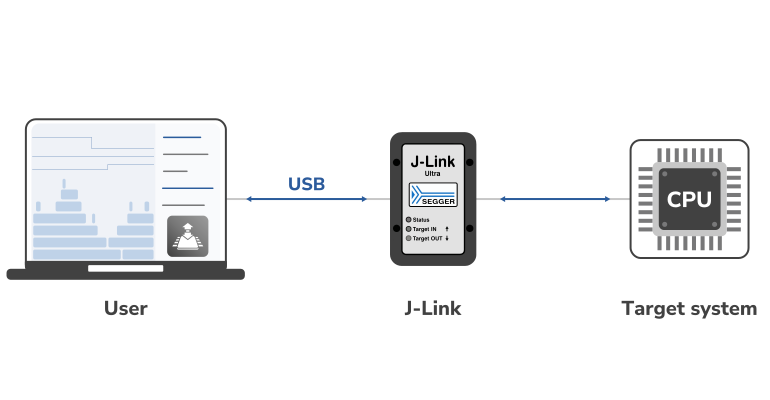
Direct connection
Connect to a J-Link locally, with the debug probe connected directly to your development computer for a seamless debugging experience.
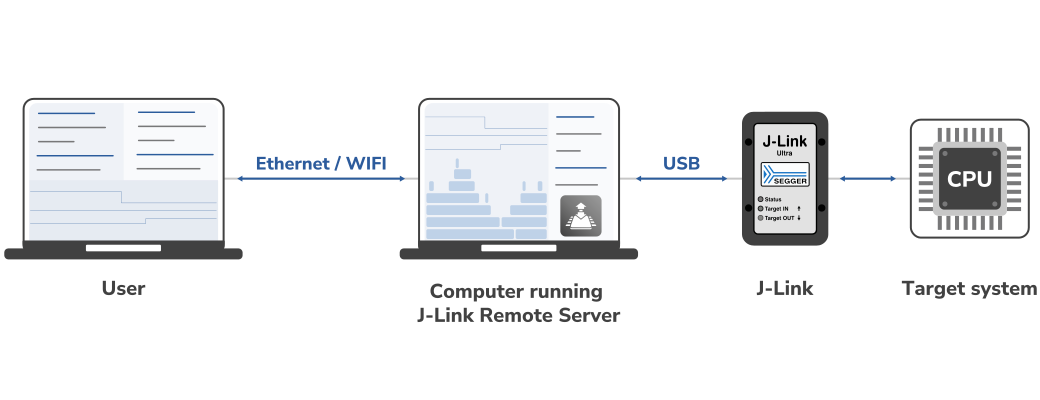
LAN mode
Access a J-Link over your local network, enabling remote debugging without physically connecting the probe to your development computer.
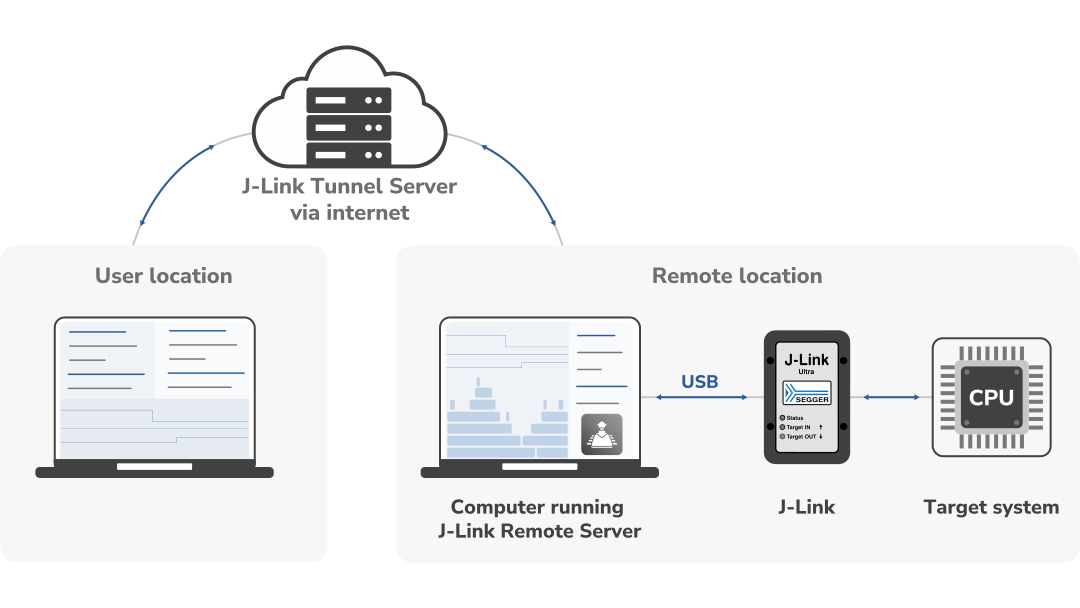
Tunnel mode
Connect to a J-Link over the Internet through a tunnel server, enabling remote access across separate firewalls.
Your own Tunnel Server – Full control

SEGGER provides a powerful, high-performance tunnel server infrastructure free of charge, enabling remote access to J-Link devices worldwide. For organizations that prefer to operate their own infrastructure, SEGGER also offers the J-Link Tunnel Server source code under a commercial license.
Secure remote connections
J-Link Remote Server supports password-based authentication and optional encryption for tunneled connections. This helps protect remote debugging sessions and makes remote access suitable for a range of development environments.
For configuration details and connection instructions, refer to the SEGGER Knowledge Base.
Getting started in three simple steps


1. Connect your hardware
Connect your J-Link to the target and a computer at the remote location via USB or IP.


2. Start J-Link Remote Server
Launch J-Link Remote Server and select LAN or Tunnel mode for remote access.


3. Connect and debug
Enter the connection details in your development tool to debug your target as if connected locally.
Licensing
The J-Link Remote Server is part of the J-Link Software and Documentation Package and is available in a GUI or command-line version. The software package is free for any J-Link or J-Trace device and can be downloaded here:
System requirements
| Supported OS | |
|---|---|
| Windows | Microsoft Windows (x86-64/Arm64) |
| macOS | macOS (x86-64/Apple Silicon) |
| Linux | Linux (x86-64/Arm64) |
FAQ
Can I use the remote connection with Embedded Studio?
Yes. The SEGGER Knowledge Base contains a brief instruction for Embedded Studio.
Can I use the remote connection with IAR Embedded Workbench IDE?
Yes. The SEGGER Knowledge Base contains a brief instruction for IAR Embedded Workbench IDE.
Can I use the remote connection with GDB / Eclipse?
Yes. The SEGGER Knowledge Base contains a brief instruction for GDB/ Eclipse.
Get in touch with us
Have questions or need assistance? Our Embedded Experts are here to help!
Reach out to us for:
- Licensing quotes
- Technical inquiries
- Project support