Flasher eMMC and SD-card programming
Create ready-to-write FAT and exFAT images using Storage Image Creator FAT.
- Program eMMC and SD cards in-system
- Create ready-to-write FAT and exFAT images
- Reduce programming time with optimized images
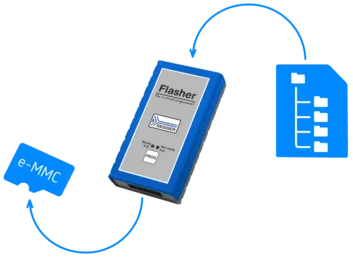
Overview
SEGGER Flashers support in-system programming of eMMCs and SD cards to enable easy and efficient production processes. In addition to programming a wide range of microcontrollers, SoCs, and external (Q)SPI flash devices, the Flasher series can also handle eMMC and SD cards via seamless integration with the Storage Image Creator command-line tool.
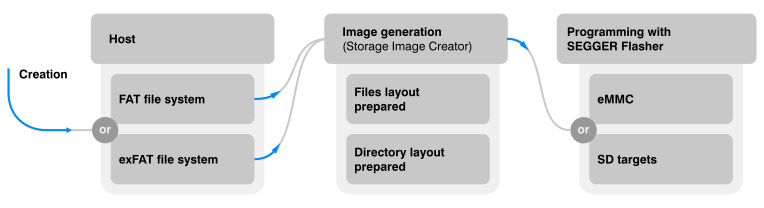
With Storage Image Creator FAT, a single, ready-to-write image is generated from files provided by the user. This workflow reduces multiple preparation steps to one write operation, enabling rapid, consistent, and high-yield production programming.
Use case
Storage Image Creator FAT for SEGGER Flashers

Many products rely on eMMCs flash memory or SD cards, and they require that an initial data set with a FAT or exFAT file system (such as emFile) be written directly during production. Storage Image Creator FAT optimizes this process by generating a ready-to-use image that can be programmed in-system, eliminating extra handling steps and reducing both effort and cost. This makes it an efficient choice for production environments in which consistent, preconfigured file systems must be prepared quickly and reliably.
How it works
Integration and workflow
Because Storage Image Creator is a command-line tool, it effortlessly integrates into CI/CD processes, enabling automatic creation of up-to-date production images without human intervention.
The utility encapsulates an entire FAT or exFAT file system as a single production file. This includes the full directory structure and files that are ready to be stored and used with no additional preparation, apart from the mounting of the file system. Essentially, the utility creates a virtual storage device on the host computer, allowing files and directories to be added exactly as they are needed on the target device.
Smart sector programming
The resulting image contains only the specific sectors required for flash memory programming. By eliminating empty space, this optimized file significantly reduces both image transfer and programming time. The image can then be written during production using a SEGGER Flasher—acting as the high-speed flash tool—to prepare the memory for the final end product.
SEGGER Image Creators
SEGGER has Image Creator tools for all major memory types. Each tool addresses the specific needs of the respective memory technology and production workflow.

FAT
Image Creator
Builds FAT or exFAT file-system images for file-based storage, such as SD and eMMC flash memory.
NAND
Image Creator
Creates images tailored for NAND flash. Handles NAND-specific layouts, bad block management, and ECC considerations.
NOR
Image Creator
Produces images optimized for NOR flash, which is useful when file contents need to be directly mapped to memory sectors.
FAQ
Do I need an additional license in order to use Storage Image Creator FAT with Flasher?
No. The Storage Image Creator FAT utility is available free of charge with the Flasher software package. You can use it to prepare images for any SEGGER flash tool without extra costs
How can I be sure that I can program eMMC flash memory and SD cards? Where do I find a Flashloader list?
eMMC flash memory and SD cards are programmed indirectly through the MCU on the target system. This requires a suitable flashloader that supports the specific pin assignment of the hardware design.
For more information or assistance with your setup, you are welcome to contact us.
How does the Flasher handle bad blocks in eMMC flash memory?
The Flasher, in combination with the Image Creator, manages the file system structure to ensure data integrity. For raw NAND flash chips, the NAND Image Creator specifically handles bad block management and ECC (Error Correction Code) requirements during the flash memory programming process.
Can I program an SD card while it is soldered to the board?
Yes. SEGGER Flashers support in-system programming (ISP) for SD cards and eMMCs that are soldered directly onto the PCB, provided the necessary pins (CMD, CLK, DATA) are accessible via a test point or header.
Get in touch with us
Have questions or need assistance? Our Embedded Experts are here to help!
Reach out to us for:
- Licensing quotes
- Technical inquiries
- Project support