Stylish and comfortable check-in/-out terminal with emPower OS
Published: July 7th, 2021
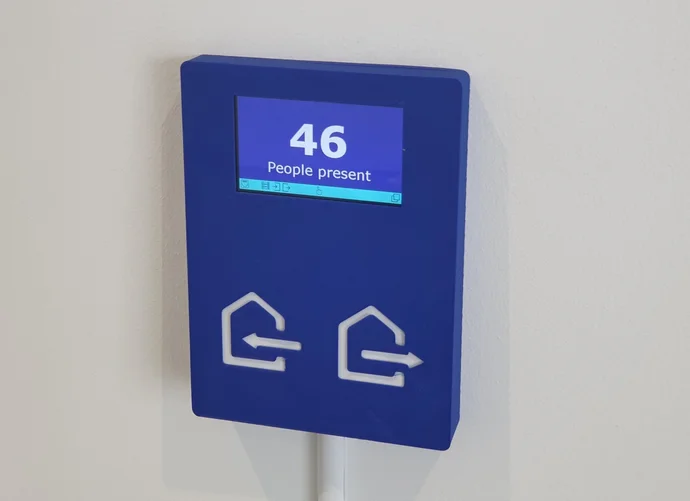
To record the presence of its employees, companies rely on a wide variety of products available on the market. SEGGER decided to take a different approach: using a 3D printer for the case, a commercially available development board costing only 50 euros, and SEGGER’s own all-in-one embedded operating system emPower OS, it developed a stylish and functional terminal, integrating already existing infrastructure and offering easy administration and usability.
Since it is purely attendance recording, login and logout times are not evaluated. SEGGER’s only concern is having an overview of the people present in the building at all times, e.g. for controlling the alarm system and in case of an event requiring evacuation.
Each SEGGER employee has a transponder or token with a unique ID that can be read via an NFC reader. When entering the building, the token is simply held in front of the “check-in” reader; when leaving, it is held in front of the “check-out” reader. That’s all. From the user’s point of view, it couldn’t be simpler.
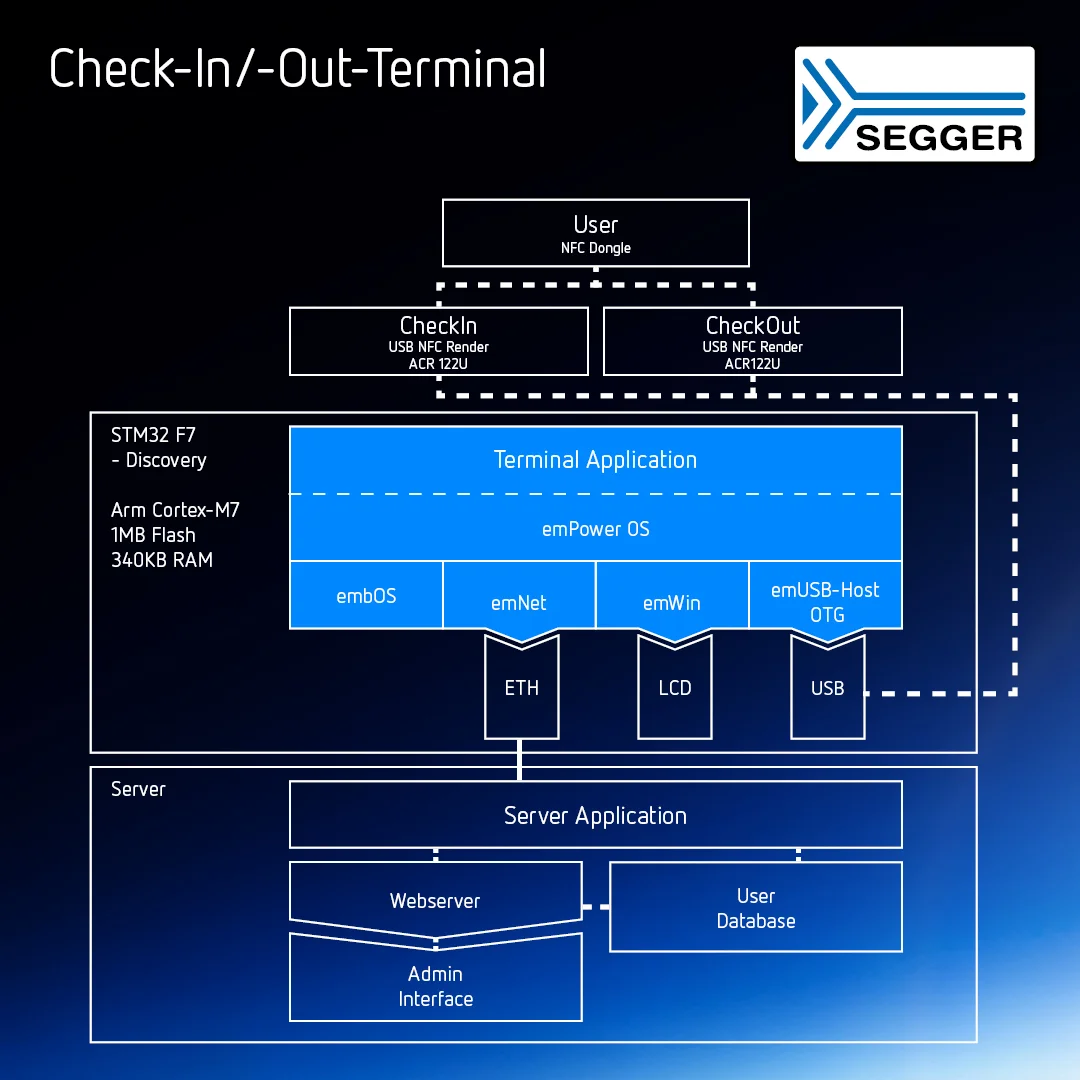
Figure 1 shows the block diagram of the terminal system. The basis is an STM32F7 discovery board from ST Microelectronics, not because the high computing power of the Arm Cortex-M7 CPU is necessary, but because with its large LC display, two USB interfaces and Ethernet interface, it contains all the elements needed for this application.
The 4.3″ RGB color LCD shows the person checking into or out of the building, and its integrated capacative touch capability enables an administrator to directly interact with it in-place. Two examples are the display of an overview of all colleagues still present and the forced check-out of a person who forgot to sign out before leaving the building.
User interface powered by emWin
The user interface is mapped using SEGGER’s emWin, the industry-leading embedded graphics library and part of emPower OS, which enables the creation of highly efficient and high-quality graphical user interfaces on any embedded system. emWin makes it possible to run impressive interactive interfaces even on resource-constrained microcontroller-based systems, and is independent of any target or display used. The following video shows how to create complete and executable emWin applications in the simplest way, even without programming knowledge, using SEGGER’s AppWizard tool.
Two USB OTG (On-the-Go) interfaces on the Discovery board serve as connectors for the two ACR122U NFC readers, which are used to read the token ID when entering and leaving the building. To reduce the terminal’s thickness, the existing USB connectors on the reader boards were removed and the cables soldered directly to the boards.
Communication with emUSB and emNet
For communication, this is where the next emPower OS component comes into play, namely emUSB-Host with the OTG add-on. emUSB-Host is USB host software specifically designed for embedded systems. It implements total USB host functionality, including support for external hubs, and optionally provides drivers for standard USB classes. Like all SEGGER software, emUSB is characterized by high performance and low memory requirements in RAM and ROM.
Last but not least, the IEEE-802.3-2002 compatible Ethernet interface of the Discovery board is used to connect to a server. The server, which is a standard PC server, runs a custom application that services check-in and check-out events sent to it by the terminal and updates the employee-present database. The server is also hosting a web server so that the administrator can access the user database using a browser interface.
LAN communication is via SEGGER’s IP stack emNet, also part of emPower OS. emNet is the industry-leading dual IPv4/IPv6 TCP/IP stack for embedded systems. Designed from the ground up for embedded systems, it is known for its high performance and low memory footprint while being flexible and extensible. It is at the heart of many industrial and IoT applications and provides support for a wide range of standard protocols.
Everything is running on SEGGER’s RTOS embOS
The user application on the terminal that controls the elements mentioned, as well as the software components themselves, run on embOS, the RTOS of emPower OS. embOS is a priority-driven, real time operating system and was designed as the foundation for embedded application development. A leader for over 28 years, this RTOS is available for all major cores, compilers, and development tools and has been deployed in billions of devices across multiple application domains. The following video shows how fast and easy it is to get embOS running.
Oct. 2017 | 21:50 min
embOS RTOS — Setup
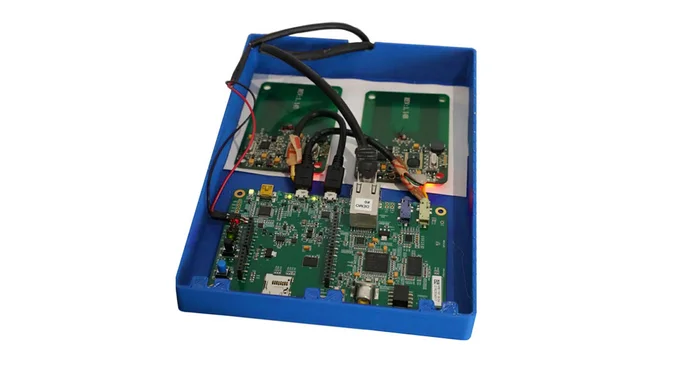
Figure 2 shows the inner workings of the terminal. Besides the Discovery board, the 3D-printed housing contains only the two NFC readers, and of course a lot of SEGGER software – invisible on the picture.
The following video shows the attendance recording in practical operation — a solution from SEGGER developers for SEGGER — which was easy, cheap and fast to implement thanks to emPower OS: It simply works!
Jul. 2021 | 0:37 min
emPower OS — Check-in/check-out terminal
Contact us for your own success story
If this success story inspired you, let's talk about how we can help you achieve similar results.
• Tailored solutions for your specific requirements
• Expert support from development to production
• Reliable tools that let you focus on what matters most
We look forward to hearing from you.