• Products
  • Software evaluation
  • Downloads
  • Free utilities
  • Purchase
  • Silicon Vendors
  • Support
  • About us
  • Blog
  • Forum
  • Search
  • Jobs
  • Newsletter
  • Blog
  • Contact
  • Shop
  • Program embedded systems
  • Authorized Flashing

    Authorized Flashing

    Intellectual-property protection for product owners.
    Production Tools Icon
    1. 1.Overview
    2. 2.Key features
      1. 2.1.IP protection
      2. 2.2.Configurable programming limits
    3. 3.Use cases
      1. 3.1.Service scenarios
      2. 3.2.Production scenarios
    4. 4.How Authorized Flashing works
    5. 5.FAQ

    Overview

    Authorized Flashing is a security feature for SEGGER Flasher in-system programmers that helps product owners protect what is theirs. Attacks on firmware images are increasingly of interest to hackers and other individuals who may seek unauthorized access for purposes of theft or counterfeiting. 

    Authorized Flashing employs a hidden partition (a secure area) that ensures that private information remains protected. Additionally, it enables users to determine the number of programming cycles in order to limit the number of devices that can be programmed. 


    Key features
    An icon featuring a blue circular background with a white shield in the center, displaying the letters "IP" in bold blue. This image symbolizes internet security and protection for IP addresses.

    IP protection

    With Authorized Flashing, firmware images are hidden, making it difficult for an unauthorized party to access them by reading a Flasher. As a result, images are secure and intellectual property (IP) protected.


    A blue circular icon featuring a white stopwatch surrounded by a circular arrow design, signifying time management or a timer function.

    Configurable programming limits

    During Flasher configuration, users can opt to limit programming cycles and, correspondingly, the number of devices that can be programmed. Once a pre-defined number of devices are programmed, the respective Flasher must be re-configured in order to start a new programming cycle.


    Use cases

    A dark blue background features softly flowing waves, creating a sense of depth and movement. Small white dots are scattered throughout, resembling a digital or technological pattern, contributing to an abstract and modern aesthetic.

    Service scenarios

    In service scenarios (e.g., in the field), devices may sometimes get lost or left behind (accidentally forgotten at a service site, stolen, etc.). By limiting the number of actions that can be performed on a device, potential damages incurred due to unwanted third-party access are reduced.

    A dark blue background features softly flowing waves, creating a sense of depth and movement. Small white dots are scattered throughout, resembling a digital or technological pattern, contributing to an abstract and modern aesthetic.

    Production scenarios

    In production scenarios, from a customer's perspective, not all manufacturing sites may be trusted sites. The higher the metaphorical security fence is, the less likely it is that overproduction or IP theft can take place. Authorized Flashing significantly increases security levels.


    How Authorized Flashing works
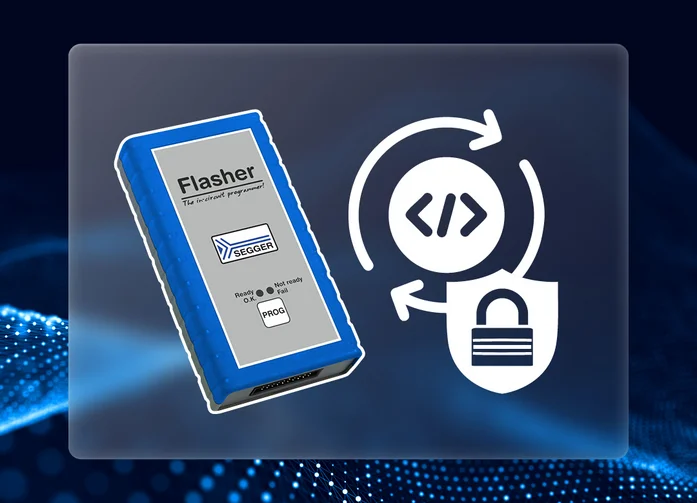
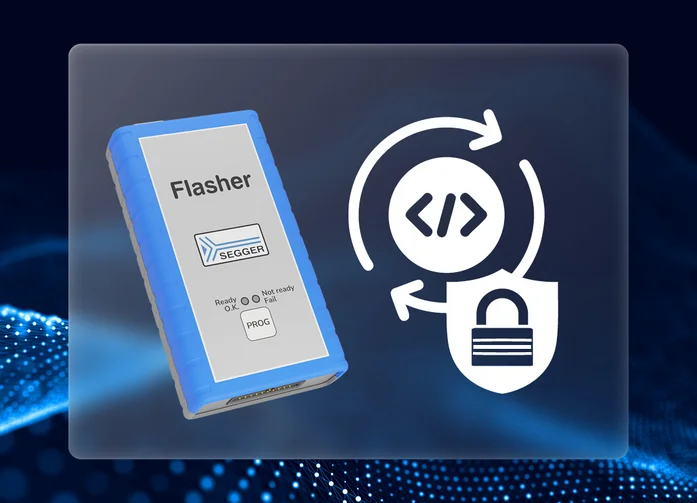
    Image shows a SEGGER Flasher device, a programming tool with a blue casing and a interface indicating ready, not ready, and fail statuses. Accompanying icons represent code transfer and security, suggesting functionality related to programming and protecting code.

    Flasher programmers allow creation of a hidden partition (referred to as a secure area) that stores the data required for a programming process. Included here is information on the number of times the data may be used for programming. 

    When a secure area is created, half of a Flasher's storage is reserved for the secure area. The secure area can be removed at any time, which results in reallocation of full storage capacity to the public area. 

    Once a Flasher has been prepared for use, the hidden partition can no longer be accessed. At this point, the user is able only to start the programming process, which uses the hidden information. Once the hidden partition is set up, it can be used either as a source for the programming process, or it can be reset (erased). 

    A secure area is created as the Flasher is prepared for use; then, the Flasher is made available to a manufacturer (e.g., a contractor); and, finally, flash programming is triggered by the end user.


    More information

    FAQ

    What Flasher models support authorized flashing?

    All Flasher models.

    Does use of the Authorized Flashing mode limit available features (e.g., support for patch files)?

    No. All features, such as support for multiple or patch files, etc., can also be used when operating from the secure area.

    Do I need a license to use Authorized Flashing?

    No. This feature is part of a Flasher device's default feature set.

    Latest news
    2025
    Dec.10
    emFile
    An image of a blue device labeled "Flasher" is central to the design, illustrating its use for programming exFAT images in production. It connects to an eMMC card and displays file structures, emphasizing efficiency in the programming process. The SEGGER logo is visible in the top corner.

    SEGGER adds exFAT support to Storage Image Creator FAT

    SEGGER’s Storage Image Creator FAT now supports the exFAT file system in addition to FAT. This update expands the range of storage configurations that can be prepared for embedded devices that use eMMC or SD cards. It also strengthens SEGGER’s toolchain for efficient preparation of file-system images in production.

    [Read more...]

    All news

    Get in touch with us

    Have questions or need assistance? Our Embedded Experts are here to help!

    Reach out to us for:

    • Licensing quotes
    • Technical inquiries
    • Project support


    Contact us

    • Release notes
    • Update notification
    • Pricing
    • Support
    • Silicon vendor resources

    Headquarters

    SEGGER Microcontroller GmbH

    Ecolab-Allee 5
    40789 Monheim am Rhein, Germany
    info@segger.com
    Tel.: +49-2173-99312-0
    Fax: +49-2173-99312-28

    Locations

    USA: SEGGER Microcontroller Systems LLC

    Boston area
    101 Suffolk Lane
    Gardner, MA 01440, USA
    us-east@segger.com
    Tel.: +1-978-874-0299
    Fax: +1-978-874-0599

    Silicon Valley
    Milpitas, CA 95035, USA
    us-west@segger.com
    Tel.: +1-408-767-4068

    China: SEGGER Microcontroller China Co., Ltd.

    Room 218, Block A, Dahongqiaoguoji
    No. 133 Xiulian Road
    Minhang District, Shanghai 201199, China
    china@segger.com
    Tel.: +86-133-619-907-60

    ISO 9001 certified

    ISO 9001

    30+ years of experience

    First-class embedded software tools since 1992
    • Imprint
    • Disclaimer
    • Code of Conduct
    • Privacy Policy
    © 2025 SEGGER - All rights reserved.