emMQTT
The embedded MQTT client library
- Designed for reliable communication in resource-constrained embedded systems
- Supports MQTT v3.1.1 and v5 for efficient publish-and-subscribe communication
- Stack-independent socket-based design enables integration with any IP stack

Key features

Low memory footprint
Designed for minimal resource usage, emMQTT requires only a few kilobytes of ROM and negligible RAM. This enables reliable MQTT communication even on highly resource-constrained microcontrollers.
Full MQTT support
emMQTT implements the full MQTT Version 3.1.1 and 5.0 protocols, meaning it works with any MQTT broker that adheres to this widely supported standard. This ensures reliable message delivery and broad compatibility in IoT and M2M communication scenarios.
TCP/IP stack independence
emMQTT works with any TCP/IP stack that supports standard sockets. As a result, it integrates into a wide range of platforms and networks without being tied to a specific stack implementation.
Use cases
IoT device telemetry
emMQTT is typically used to publish sensor data (such as temperature, pressure, motion, and power usage data) from microcontrollers to cloud platforms, for example. Its small memory footprint makes it ideal for constrained devices that need reliable, low-resource-consumption messaging over TCP/IP. Furthermore, it offers reliable QoS, and it works with very small microcontrollers.
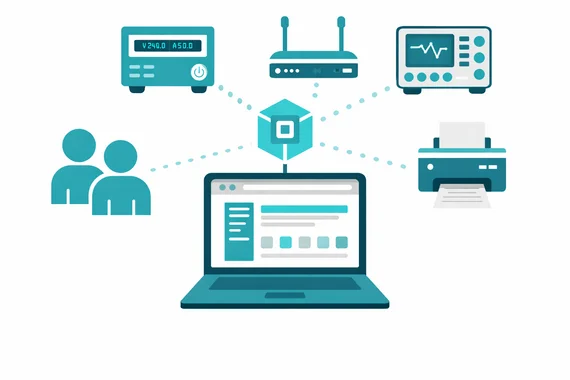

Device monitoring and status tracking
emMQTT enables efficient device monitoring and status tracking in distributed systems.
Using retained messages and Last Will functionality, device states can be tracked even when devices connect intermittently. This allows systems to detect outages, monitor availability, and maintain up-to-date status information across large device fleets.
Firmware update notification and control
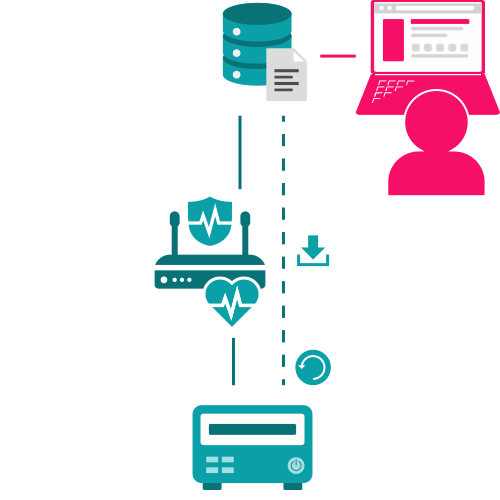
emMQTT can be used to signal firmware updates to connected devices.
Instead of transferring large firmware images via MQTT, the broker is used to notify devices about available updates. Devices can then retrieve the firmware via a more efficient transfer mechanism, enabling scalable and bandwidth-efficient update workflows.
How MQTT works – and how emMQTT fits in
MQTT is a lightweight publish/subscribe messaging protocol designed for efficient communication over TCP/IP, especially in resource-constrained environments. emMQTT implements the client side of this model and integrates seamlessly into existing systems using a socket-based architecture.
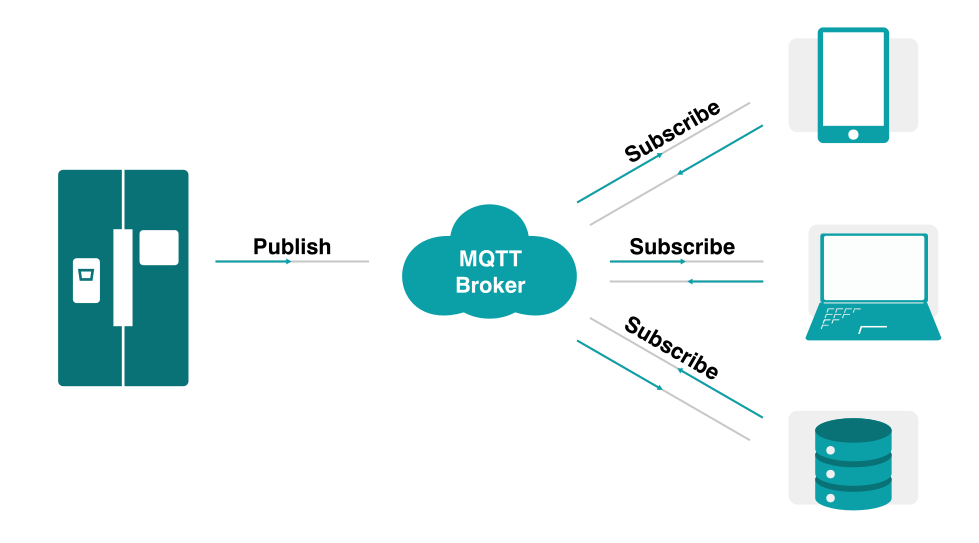
Publish/Subscribe model
Instead of direct client-to-client communication, MQTT uses a broker to exchange messages between devices.
- A publisher sends messages to a topic
- A subscriber receives messages for that topic
- The broker manages message distribution
Communication is asynchronous: publishers and subscribers do not need to be connected at the same time. Messages are delivered while a client is connected to the broker.
This decouples sender and receiver, allowing devices to operate independently and efficiently.
Why MQTT is ideal for embedded systems
MQTT’s low overhead and efficient message handling make it ideal for constrained devices and unstable networks. emMQTT is specifically optimized for these environments, enabling reliable communication with minimal memory and CPU usage.
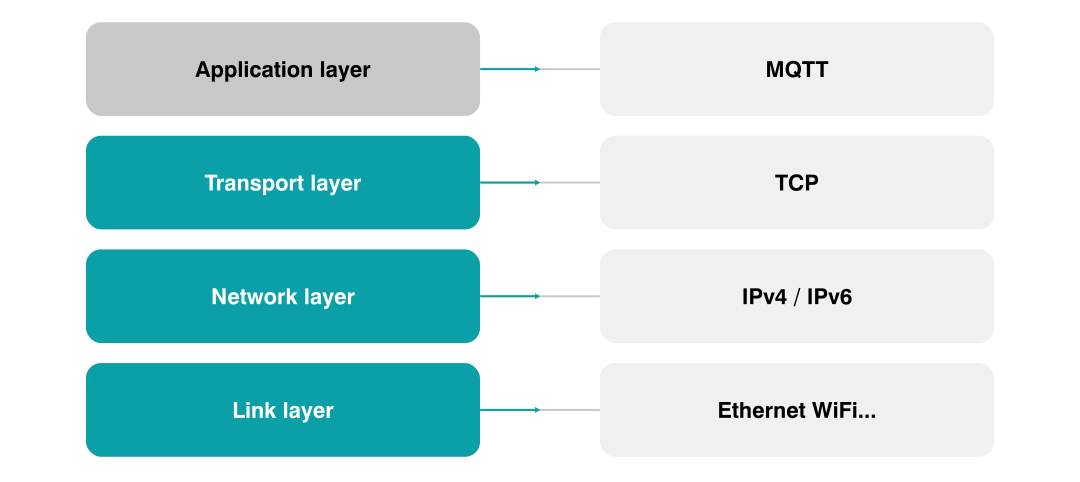
MQTT in the TCP/IP stack
MQTT operates at the application layer on top of TCP/IP and can be used with any underlying network technology.
Getting started with emMQTT
To get started quickly with emMQTT, a ready-to-use MQTT client application is available for download. The application is a simple command-line tool that allows connecting to any MQTT broker and testing publish/subscribe communication. It uses emMQTT together with emSSL for secure connections and runs on the host system’s native TCP/IP stack (e.g. Windows).
It allows connecting to any MQTT broker and testing publish/subscribe communication within minutes.
Typical first steps:
- Connect to a broker
- Subscribe to a topic
- Publish a test message
All features demonstrated in the client application can be transferred directly to embedded target systems.
Compatibility and integration
emMQTT is fully compatible with all MQTT brokers that adhere to the v3.1.1 or the v5 standard, ensuring seamless integration into existing systems.
MQTT brokers can run locally or in cloud environments and can be connected to backend systems such as databases or analytics services for further processing.
Broker overview
The table below lists a selection of brokers with which the add-on has been tested. If a broker or cloud provider is not included, emMQTT can still be used. In this case, the connection can be verified using the MQTT Client Application.
| Broker/service | Plain MQTT | MQTT over TLS | MQTT over TLS with Client Certificate | Notes |
|---|---|---|---|---|
| mosquitto | Open-source MQTT broker for Linux, Windows, and macOS. Tested with a public broker at mqtt.eclipse.org | |||
| HiveMQ | 1 | 1 | Enterprise MQTT broker for Linux servers. Tested with a public broker at hivemq.com | |
| AWS | Support for MQTT in connecting to the AWS IoT Message Broker. |
1Not available on public broker
Resource usage
ROM usage depends on compiler options, the compiler version, and the CPU employed. emMQTT's memory requirements presented in the table below were measured on a Cortex-M4 system.
| Resource usage | Value |
|---|---|
| emMQTT client size (ROM) | Approx. 2.4 KB |
| emMQTT client size (RAM) | 8 byte |
| emMQTT client context (RAM) | 76 byte |

Licensing
The software is available under various embedded software license models and can be delivered as source code. All commercial licenses are based on a one-time payment, are royalty-free, and include six months of updates and support from SEGGER’s Embedded Experts.
There are no subscription fees, ensuring predictable and fixed costs over the entire product lifetime.
For non-commercial use, evaluation, and educational purposes, the software is provided under SEGGER’s Friendly License.
Get in touch with us
Have questions or need assistance? Our Embedded Experts are here to help!
Reach out to us for:
- Licensing quotes
- Technical inquiries
- Project support