Encryption
Protect sensitive data with transparent file system encryption
- Encrypt individual files or entire storage devices
- Use with FAT and EFS across all supported storage media
- Integrate encryption with minimal application changes
Overview
The Encryption add-on provides an easy way to protect individual files or entire storage devices. It can be used with both supported file systems, EFS and FAT, and with all supported storage media, including NAND, NOR, and SD / MMC cards.
Only minor changes to the application are required to enable encryption. All other application functionality remains unchanged.
Encryption and decryption are performed in software at high speed. If the target provides hardware-accelerated encryption, emFile can take advantage of it to further improve performance.
Key features
- Can be used with both FAT and EFS file systems
- All storage device types such as NAND, NOR, SD/MMC cards are supported
- Minimal changes of the application are required
- DES and AES with 128-bit and 256-bit key lengths supported
- Supports encryption of entire media or of individual files
- Comes with PC utility to decrypt/encrypt files
Editions
emFile Encryption is available in two different editions.
| Encryption | Extra Strong Encryption | |
|---|---|---|
| DES | ||
| AES 128-bit | ||
| AES 256-bit |
How to use encryption
Encryption on target side
Using file encryption is very simple from the perspective of the user. The following steps have to be performed to enable encryption in your application:
- Enable file encryption in the emFile configuration by setting FS_SUPPORT_ENCRYPTION define to 1.
- Call FS_CRYPT_Prepare() to initialize an encryption object. This operation has to be performed only once.
- Open a file and call FS_SetEncryptionObject() to assign the encryption object to that file handle.
These are the only changes required to be performed in the application. Everything else is done by the Encryption add-on.
The following sample function opens a file and writes a text message to it. The file contents is encrypted using the DES encryption algorithm.
void FileEncryptionSample(void) {
  FS_FILE                * pFile;
  const U8                 aKey[8] = {1, 2, 3, 4};
  FS_CRYPT_OBJ             CryptObj;
  static FS_DES_CONTEXT    _Context;
  static int               _IsInited;

  //
  // Create the encryption object. It contains all the necessary
  // information for the encryption/decryption of data. This step
  // has to be performed only once.
  //
  if (_IsInited == 0) {
    FS_CRYPT_Prepare(&CryptObj,
                     &FS_CRYPT_ALGO_DES,
                     &_Context,
                     512,
                     aKey);
    _IsInited = 1;
  }
  pFile = FS_FOpen("des.bin", "w");
  if (pFile) {
    //
    // Assign the created encryption object to file handle.
    //
    FS_SetEncryptionObject(pFile, &CryptObj);
    //
    // Write data to file using encryption.
    //
    FS_Write(pFile, "This message has been encrypted using", 37);
    FS_Write(pFile, " SEGGER emFile Encryption add-on.\n", 33);
    FS_FClose(pFile);
  }
}
Decryption on PC side
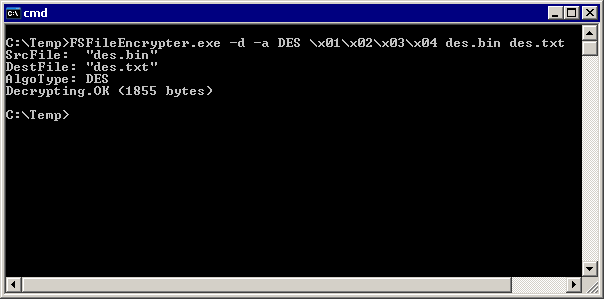
The file encrypted on the target system can be decrypted on a PC using the File Encrypter command line tool. The following screenshot shows the messages printed out by utily while decrypting the contents of the des.bin file. The decripted contents is stored to des.txt file. In this case the encryption algorithm used is DES as specified unsing the -a option. The File Encrypter utility shows information about the progress of the decrypting process. In case of an error, a message is displayed and the utility returns with a status of 1 and the file is not decrypted.
Performance
These performance measurements are in no way complete, but they give an approximation of the length of time required for common operations on various targets.
| Target Device | CPU speed | Storage device | Write speed | Read speed |
|---|---|---|---|---|
| NXP Kinetis K60 | 120 MHz | NAND flash interfaced via 8-bit bus using AES with an 128-bit key. | 522 Kbytes/sec | 553 Kbytes/sec |
| ST STM32F4 | 96 MHz | SD card as storage medium using AES with an 128-bit key | 500 Kbytes/sec | 530 Kbytes/sec |