External toolchains
Combine external toolchains with powerful IDE and debugging features
- Integrate existing toolchains into Embedded Studio
- Use multiple toolchains within a single project
- Import projects from IAR and Keil
Overview
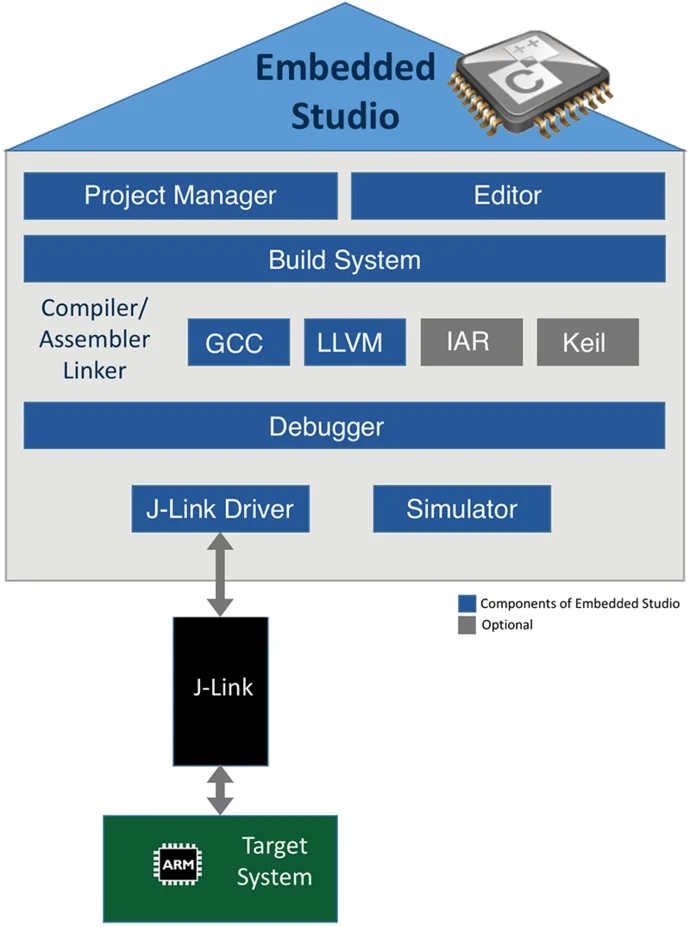
Embedded Studio - GCC, LLVM, IAR and Keil under one roof
Embedded Studio supports the use of external toolchains, such as the compilers from IAR and Keil. The feature allows building with the external compiler while at the same time allowing developers to take advantage of the superior Embedded Studio IDE features of managing projects and advanced debugging capabilities. With external toolchain support, Embedded Studio can simply build your project on the original toolchain it has been created for. You can continue to build with the former tools while seamlessly migrating to Embedded Studio. After migration you can completely switch to the internal toolchains or continue to build releases with the original toolchain and use the internal toolchain for development only.
Key features
Support for external toolchains
Work with existing IAR or Keil toolchains without changing your established development environment. Embedded Studio integrates seamlessly into existing workflows while adding its own development and debugging capabilities.
Multi-toolchain builds
Maintain multiple build configurations for the same project and switch easily between different toolchains. This simplifies validation, comparison, and support for different project requirements.
Easy migration to internal toolchains
Move to the Embedded Studio toolchain at your own pace instead of all at once. Parallel build configurations allow you to verify results and reduce migration risk throughout the transition.
Project importer for common IDEs
Bring existing IAR Embedded Workbench and Keil MDK projects into Embedded Studio with minimal effort. The importer transfers project settings automatically, making it quick to get started.
Import existing projects to Embedded Studio

A detailed description on how to port from IAR to Embedded Studio can be found in our Wiki.
Quick start guide: Existing IAR Embedded Workbench and Keil uVision projects can easily be imported with Embedded Studio.
Go to File -> Import IAR EWARM / Keil MDK Project... and select the project file to import.
Migration guide
While imported projects will re-built with the external toolchain out-of-the-box, for GCC (and LLVM) based project build configurations, some manual changes may be required. In some cases the sources are created to be GCC compatible, then you can seamlessly switch between original toolchain and GCC. When the original project is created from a software pack or SDK, it might already come with GCC compatible source files which can replace the former toolchain compatible files.
The following section lists the most common changes which are required to migrate a project to Embedded Studio. If you are missing any instructions or have trouble importing your project to Embedded Studio, contact us at info@segger.com.
Most common source changes
Linker Script: The Embedded Studio project importer does not import linker scripts (e.g. IAR icf files). It sets up the basic memory map for the selected target device, which will put code into the internal flash and data into the internal SRAM.
For more advanced or different configurations, the memory map file and the section placement file have to be set up accordingly.
Third-party software and libraries
Third-party software, especially libraries, might be configured for one toolchain and do not compile with other toolchains.
Check if there is a port of the software for Embedded Studio / GCC or configure and rebuild the software for Embedded Studio / GCC.
Although libraries built for another toolchain may link with Embedded Studio, always take care and check that interfacing with the library works as expected.
Assembly files and inline assembly
The syntax of assembler code and control commands in assembler files can be different across toolchains.
Although the resulting assembled instructions are identical, the assembler code to be written can be different across toolchains, for example numerical constants need to be declared differently for IAR and GCC.
Control commands which help writing assembler code is different, too. The syntax for symbols, labels, function definitions, and alike needs to be adjusted to work with the GNU assembler.
Preprocessor defines
Toolchains use different built-in definitions to identify the compiler which is used and to allow conditional compilation based on the configuration of core, device, endianess, and other settings.
It is mandatory to choose the correct definitions and recommended to make sure the code throws a warning or error when required definitions are not defined.
IAR defines __ICCARM__ and __IAR_SYSTEMS_ICC__ which can be used for identification, Embedded Studio defines __SES_ARM and __GNUC__.
For the target device IAR defines __ARM7M__ and __CORE__=__ARM7M__ when compiling for Cortex-M4, Embedded Studio uses __ARM_ARCH_7M__ instead.
Toolchain intrinsics
Compiler-specific functions like __disable_interrupt() might not be available in Embedded Studio. Write corresponding replacement functions or avoid using them at all.
How to import an IAR project into Embedded Studio
Learn how to import an IAR Embedded Workbench project into Embedded Studio using the built-in Project Importer. This short video demonstrates the complete workflow and highlights how quickly existing projects can be migrated and built in Embedded Studio.
FAQ
Why should I switch to Embedded Studio?
Embedded Studio is an industry leading streamlined and powerful IDE. It is specifically designed for professional embedded development: an all-in-one solution providing stability and a continuous workflow.
What is the difference to other IDEs?
Embedded Studio is a professional embedded development IDE designed by embedded engineers for embedded engineers. Unlike many traditional IDEs, it offers a fast, lightweight, cross-platform development environment for Windows, macOS, and Linux, with no code size limitations or feature restrictions. Built-in support for external toolchains, easy project migration from IAR and Keil, and a flexible licensing model make Embedded Studio a powerful alternative for modern embedded software development.
Can I import existing IAR or Keil projects?
Yes. Embedded Studio includes a built-in Project Importer that allows developers to import existing IAR Embedded Workbench and Keil MDK projects in just a few clicks while preserving their original build configurations. Based on the import settings, projects can continue using the original toolchain or switch to the Embedded Studio toolchain.
Can I use multiple toolchains in one project?
Yes. Embedded Studio supports multi-toolchain build configurations, enabling developers to build the same project with both internal and external toolchains and switch between them as needed.
How easy is it to migrate to the Embedded Studio toolchain?
Migration is straightforward. During project import, Embedded Studio can automatically create both internal and external build configurations, allowing teams to validate and transition projects step-by-step without disrupting existing workflows.
Which compilers are supported by Embedded Studio?
Embedded Studio supports GCC and LLVM out of the box and can also integrate external IAR and Keil toolchains, providing maximum flexibility for embedded development teams.