Ozone system insight
Simplified verification of complex systems via RTOS awareness and SmartView middleware support
Overview
Modern embedded systems continue to grow in complexity, and this requires debug tools to condense information for simplified observability. Ozone provides RTOS awareness and SmartView middleware support. Among other things, SmartView enables developers to create their own windows or visualizations.
RTOS awareness
Without the right tools, debugging RTOS-based firmware can seem like an unfathomable task. Developers have to deal with more than just a single loop of code execution; they have to handle multiple active tasks in parallel. Moreover, there are also system resources, communication objects, and locking items. To address the complexity in RTOS debugging, Ozone provides RTOS Awareness modules.
RTOS window
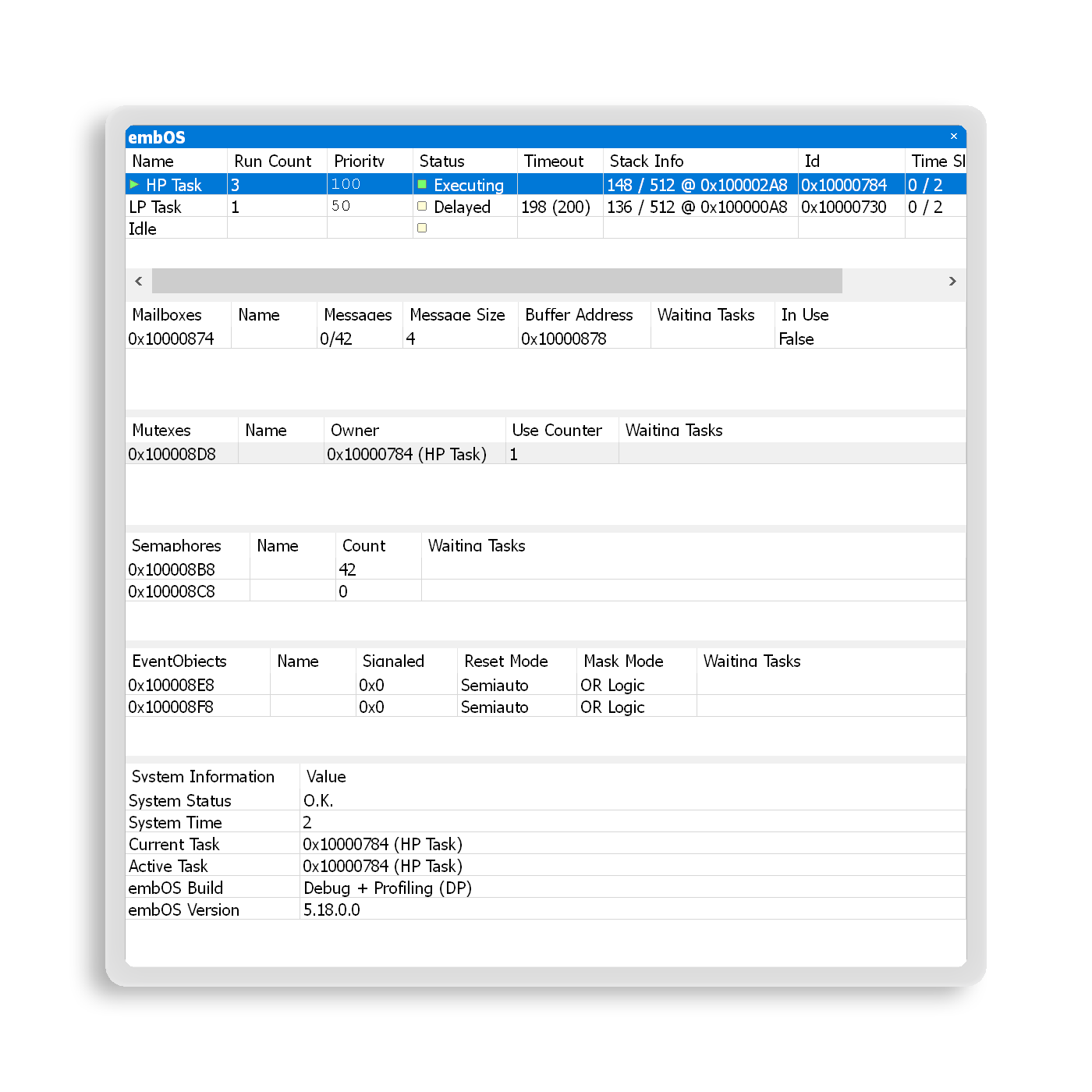
When a target is halted, the RTOS window lists all of a system's tasks and extends information beyond the currently active context. For each task, information is available on status, priority, stack usage, and more. Ozone also enables task selection, so that a user can inspect a task's current state of execution and call stack, as if the debugger had halted there.
RTOS Awareness provides details on system resources. By checking on owners and waiting tasks for mutexes and semaphores, RTOS Awareness can help find deadlocks and priority inversion within a system. Through inspection of mailboxes and queues, useful information is revealed on communication between tasks, as well as possible bottlenecks. By providing users with access to events and software timers, RTOS Awareness can help them understand triggers and execution behavior.
Ozone's RTOS Awareness makes inspecting RTOS-based systems easy, and it and provides comprehensive insights.
Third-party RTOS support
Ozone can be set up to recognize any RTOS. If Ozone does not support your current RTOS, please contact us.
SmartView
Middleware modules, such as communication stacks, file systems, and graphics libraries, can be overwhelmingly complex. Their state may be implemented in code through various structures and variables which represent the inner workings of the module.
Debugging and inspecting such middleware by looking at its code and symbols can be challenging. With externally developed modules, this task can even be nearly impossible.
Ozone's SmartView provides an easy-to-grasp, high-level view into middleware. It enables straightforward and efficient analysis of complex modules and assists in giving users a clear view into complete systems.

Refined system information
SmartView retrieves data from a system and analyzes it. Such data can, for example, constitute a linked list of file-handle structures for opened files in a file system. Examination of structures and lists can be carried out in the Watched Data window, but this can easily become cumbersome and complicated. Furthermore, the symbols windows present data as it is used in code, which could be difficult for a human to decipher.
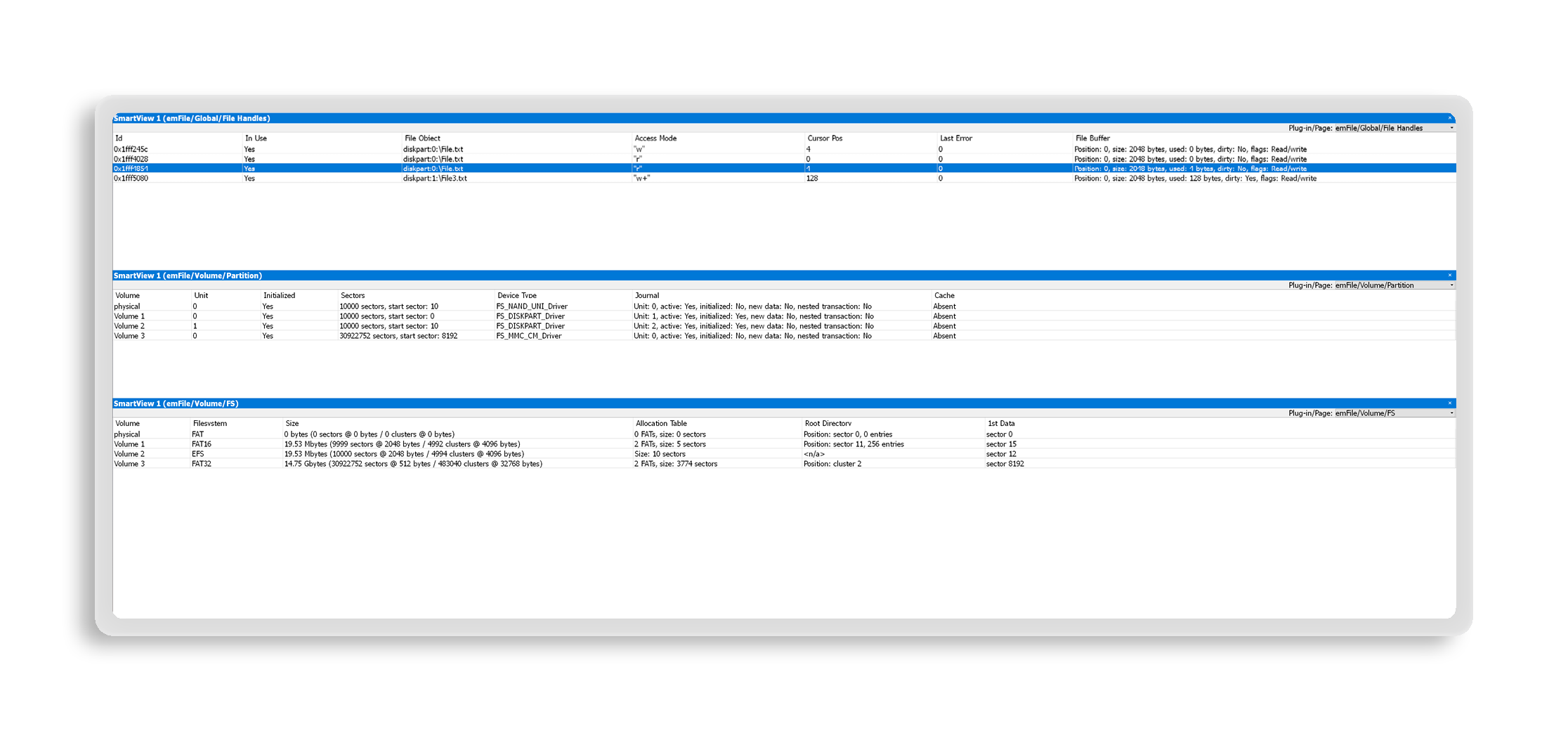
SmartView polishes and refines data to present them in a human-readable form. The aforementioned list of opened files can be shown in a table view. While each row represents one file, the columns represent the members of the structure. Every cell displays analyzed and enriched information rather than plain values. File names are shown as full paths instead of pointers, file size is displayed in appropriate units, partition information becomes meaningful, and status flags are converted from bitfields into words.
Plug-ins with full target access
SmartView provides users with the highest levels of flexibility, allowing them to design useful views. It bridges the gap between internal implementation with structure-heavy code requirements and external views that need efficient debugging. To create a SmartView plug-in, Ozone provides an interface that enables full access to debug information and the relevant target system. Data can be processed via JavaScript plug-in files for populating the SmartView Window with views and content.
SmartView plug-ins can define different views to organize information. Users can select views of interest and show them in multiple flexibly arranged windows. With support for all types of middleware, SmartView enables visualization of a complete embedded system.
Available middleware plug-ins
SmartView plug-ins are readily available for emFile and emNet. The emFile plug-in provides views for global information, memory management, file handles and objects, volume and partition information, and file system configuration.
The plug-in for emNet offers views for a global overview, sockets, interfaces, and connections. To support third-party middleware, SmartView plug-ins can be created by both users and third parties.