|
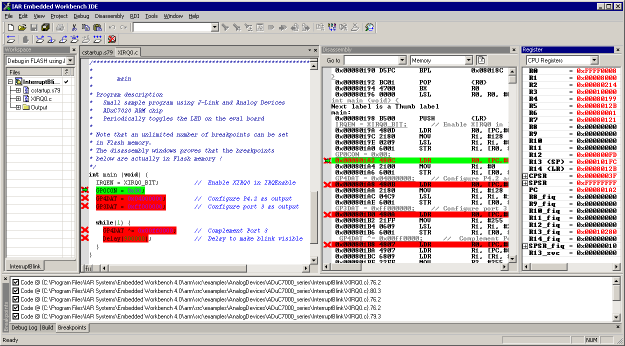
The J-Link RDI software contains an add. feature, called
Flash break points (short FlashBPs). This feature requires an add. license.
It adds the ability to set an unlimited number of software breakpoints
in flash memory areas, rather than just the 2 hardware breakpoints.
How do breakpoints work?
There are basically 2 types of breakpoints in a computer
system: Hard ones and soft ones. Hard BPs require a dedicate hardware
unit for every hardware breakpoint. In other words, the hardware dictates
how many hardware breakpoints can be set simultaneously. ARM7 and ARM
9 cores have 2 breakpoint units (called "watchpoint units" in ARM's documentation),
allowing 2 hardware breakpoints to be set. Hardware breakpoints do not
require modification of the program code. Software breakpoints are different:
The debugger modifies the program and replaces the breakpointed instruction
with a special value. Add. soft BPs do not require add. hardware units
in the processor, since simply more instructions are replaced. This is
a standard procedure that most debuggers are capable of, however, it requires
the program to be located in RAM.
What is special about software breakpoints in flash
?
It allows you to set an unlimited number of breakpoints
even if your application program is not located in RAM, but in Flash memory.
This is a scenario which was very rare before ARM-microcontrollers hit
the market. This new technology makes very powerful, yet inexpensive ARM
microcontrollers available for systems, which required external RAM before.
The downside of this new technology is that it is not possible to debug
larger programs on these Micros in RAM, since the RAM is not big enough
to hold program and data (typically, these chips contain about 4 times
as much flash as RAM), and therefore with standard debuggers, only 2 breakpoints
can be set. The 2 breakpoint limit makes debugging very tough; a lot of
times the debugger requires 2 breakpoints to simply step over a line of
code. With software breakpoints in Flash, this limitation is gone.
How does this work ?
Basically very simple:
The J-Link RDI-software reprograms a sector of the flash to set or clear
a breakpoint.
What performance can I expect ?
A RAM code, specially designed for this purpose, sets
and clears Flash breakpoints extremely fast; on micros with fast flash
the difference between breakpoints in RAM and Flash is hardly noticeable
How is this performance achieved ?
We have put a lot of effort in making FlashBPs really
usable and convenient. Flash sectors are programmed only when necessary;
this is usually the moment execution of the target program is started.
A lot of times, more then one breakpoint is located in the same flash
sector, which allows programming multiple breakpoints by programming just
a single sector. The contents of program memory are cached, avoiding time
consuming reading of the flash sectors. A smart combination of software
and hardware breakpoints allows us to use hardware breakpoints a lot of
times, especially when the debugger is source level-stepping, avoiding
reprogramming of the flash in these situations. A built-in instruction
set simulator further reduces the number of flash operations which need
to be performed. This minimizes delays for the user, maximizing the life
time of the flash. All resources of the ARM micro are available to the
application program, no memory is lost for debugging. All of the optimizations
described above can be disabled.
The feature is available for the following chips at
this time:
| Analog Devices |
ADuC7020x62 |
16 |
62 KB |
| Analog Devices |
ADuC7021x32 |
16 |
32 KB |
| Analog Devices |
ADuC7021x62 |
16 |
62 KB |
| Analog Devices |
ADuC7022x32 |
16 |
32 KB |
| Analog Devices |
ADuC7022x62 |
16 |
62 KB |
| Analog Devices |
ADuC7024x62 |
16 |
62 KB |
| Analog Devices |
ADuC7025x32 |
16 |
32 KB |
| Analog Devices |
ADuC7025x62 |
16 |
62 KB |
| Analog Devices |
ADuC7026x62 |
16 |
62 KB |
| Analog Devices |
ADuC7027x62 |
16 |
62 KB |
| Analog Devices |
ADuC7028x62 |
16 |
62 KB |
| Analog Devices |
ADuC7030 |
16 |
30 KB |
| Analog Devices |
ADuC7031 |
16 |
30 KB |
| Analog Devices |
ADuC7032 |
16 |
94 KB |
| Analog Devices |
ADuC7033 |
16 |
94 KB |
| Analog Devices |
ADuC7060 |
16 |
30 KB |
| Analog Devices |
ADuC7128 |
16 |
126 KB |
| Analog Devices |
ADuC7129 |
16 |
126 KB |
| Analog Devices |
ADuC7229x126 |
16 |
126 KB |
| Atmel |
AT91SAM7A3 |
32 |
256 KB |
| Atmel |
AT91SAM7S32 |
32 |
32 KB |
| Atmel |
AT91SAM7S321 |
32 |
32 KB |
| Atmel |
AT91SAM7S64 |
32 |
64 KB |
| Atmel |
AT91SAM7S128 |
32 |
128 KB |
| Atmel |
AT91SAM7S256 |
32 |
256 KB |
| Atmel |
AT91SAM7S512 |
32 |
512 KB |
| Atmel |
AT91SAM7SE32 |
32 |
32 KB |
| Atmel |
AT91SAM7SE256 |
32 |
256 KB |
| Atmel |
AT91SAM7SE512 |
32 |
512 KB |
| Atmel |
AT91SAM7X128 |
32 |
128 KB |
| Atmel |
AT91SAM7X256 |
32 |
256 KB |
| Atmel |
AT91SAM7X512 |
32 |
512 KB |
| Atmel |
AT91SAM7XC128 |
32 |
128 KB |
| Atmel |
AT91SAM7XC256 |
32 |
256 KB |
| Atmel |
AT91SAM7XC512 |
32 |
512 KB |
| NXP |
LPC2101 |
32 |
8 KB |
| NXP |
LPC2102 |
32 |
16 KB |
| NXP |
LPC2103 |
32 |
32 KB |
| NXP |
LPC2104 |
32 |
120 KB |
| NXP |
LPC2105 |
32 |
120 KB |
| NXP |
LPC2106 |
32 |
120 KB |
| NXP |
LPC2109 |
32 |
64 KB |
| NXP |
LPC2114 |
32 |
120 KB |
| NXP |
LPC2119 |
32 |
120 KB |
| NXP |
LPC2124 |
32 |
120 KB |
| NXP |
LPC2129 |
32 |
248 KB |
| NXP |
LPC2131 |
32 |
32 KB |
| NXP |
LPC2132 |
32 |
64 KB |
| NXP |
LPC2134 |
32 |
128 KB |
| NXP |
LPC2136 |
32 |
256 KB |
| NXP |
LPC2138 |
32 |
500 KB |
| NXP |
LPC2141 |
32 |
32 KB |
| NXP |
LPC2142 |
32 |
64 KB |
| NXP |
LPC2144 |
32 |
128 KB |
| NXP |
LPC2146 |
32 |
256 KB |
| NXP |
LPC2148 |
32 |
500 KB |
| NXP |
LPC2194 |
32 |
248 KB |
| NXP |
LPC2212 |
32 |
248 KB |
| NXP |
LPC2214 |
32 |
248 KB |
| NXP |
LPC2292 |
32 |
248 KB |
| NXP |
LPC2294 |
32 |
248 KB |
| NXP |
LPC2364 |
32 |
128 KB |
| NXP |
LPC2366 |
32 |
256 KB |
| NXP |
LPC2368 |
32 |
500 KB |
| NXP |
LPC2378 |
32 |
500 KB |
| NXP |
LPC2468 |
32 |
500 KB |
| NXP |
LPC2478 |
32 |
500 KB |
| OKI |
ML67Q4002 |
32 |
256 KB |
| OKI |
ML67Q4003 |
32 |
512 KB |
| OKI |
ML67Q4050 |
32 |
64 KB |
| OKI |
ML67Q4051 |
32 |
128 KB |
| OKI |
ML67Q4060 |
32 |
64 KB |
| OKI |
ML67Q4061 |
32 |
128 KB |
| ST |
STR710FZ1 |
32 |
144 KB |
| ST |
STR710FZ2 |
32 |
272 KB |
| ST |
STR711FR0 |
32 |
80 KB |
| ST |
STR711FR1 |
32 |
144 KB |
| ST |
STR711FR2 |
32 |
272 KB |
| ST |
STR712FR0 |
32 |
80 KB |
| ST |
STR712FR1 |
32 |
144 KB |
| ST |
STR712FR2 |
32 |
272 KB |
| ST |
STR715FR0 |
32 |
80 KB |
| ST |
STR730FZ1 |
32 |
128 KB |
| ST |
STR730FZ2 |
32 |
256 KB |
| ST |
STR731FV0 |
32 |
64 KB |
| ST |
STR731FV1 |
32 |
128 KB |
| ST |
STR731FV2 |
32 |
256 KB |
| ST |
STR735FZ1 |
32 |
128 KB |
| ST |
STR735FZ2 |
32 |
256 KB |
| ST |
STR736FV0 |
32 |
64 KB |
| ST |
STR736FV1 |
32 |
128 KB |
| ST |
STR736FV2 |
32 |
256 KB |
| ST |
STR750FV0 |
32 |
80 KB |
| ST |
STR750FV1 |
32 |
144 KB |
| ST |
STR750FV2 |
32 |
272 KB |
| ST |
STR751FR0 |
32 |
80 KB |
| ST |
STR751FR1 |
32 |
144 KB |
| ST |
STR751FR2 |
32 |
272 KB |
| ST |
STR752FR0 |
32 |
80 KB |
| ST |
STR752FR1 |
32 |
144 KB |
| ST |
STR752FR2 |
32 |
272 KB |
| ST |
STR755FR0 |
32 |
80 KB |
| ST |
STR755FR1 |
32 |
144 KB |
| ST |
STR755FR2 |
32 |
272 KB |
| ST |
STR755FV0 |
32 |
80 KB |
| ST |
STR755FV1 |
32 |
144 KB |
| ST |
STR755FV2 |
32 |
272 KB |
| ST |
STR911FAM46 |
16 |
1152 KB |
| ST |
STR911FAM47 |
16 |
2176 KB |
| ST |
STR911FAW46 |
16 |
1152 KB |
| ST |
STR911FAW47 |
16 |
2176 KB |
| ST |
STR911FM32 |
16 |
288 KB |
| ST |
STR911FM44 |
16 |
544 KB |
| ST |
STR911FW32 |
16 |
288 KB |
| ST |
STR911FW44 |
16 |
544 KB |
| ST |
STR912FAW46 |
16 |
1152 KB |
| ST |
STR912FAW47 |
16 |
2176 KB |
| ST |
STR912FAZ46 |
16 |
1152 KB |
| ST |
STR912FAZ47 |
16 |
2176 KB |
| ST |
STR912FM32 |
16 |
288 KB |
| ST |
STR912FM44 |
16 |
544 KB |
| ST |
STR912FW32 |
16 |
288 KB |
| ST |
STR912FW44 |
16 |
544 KB |
| TI |
TMS470R1A64 |
32 |
63 KB |
| TI |
TMS470R1A128 |
32 |
127 KB |
| TI |
TMS470R1A256 |
32 |
255 KB |
| TI |
TMS470R1A288 |
32 |
287 KB |
| TI |
TMS470R1A384 |
32 |
383 KB |
| TI |
TMS470R1B512 |
32 |
511 KB |
| TI |
TMS470R1B768 |
32 |
767 KB |
| TI |
TMS470R1B1M |
32 |
1023 KB |
| TI |
TMS470R1VF288 |
32 |
287 KB |
| TI |
TMS470R1VF688 |
32 |
255 KB |
| TI |
TMS470R1VF689 |
32 |
383 KB |
More chips will be supported in the future.
Licensing
The software is licensed on a per J-Link basis. It requires
a J-Link with RDI feature.
The following items are required to use software:
- J-Link
- RDI license
- Flash breakpoints license
In order to receive your free 30 days trial license,
follow the steps on how
to obtain and installing the license key.
Setting up flash breakpoints
| Step 1 |
| Download the
RDI software. |
| Step 2 |
Unzip the files to a folder on your hard drive e.g.
c:\Segger\JLinkRDI. Important:
The IAR program folder (normally C:\Program Files\IAR Systems\Embedded
Workbench 4.0\arm\bin) contains a version of JLinkARM.dll. Please
overwrite this older version with the new version in the zip file.
|
| Step 3 |
| Start the IAR Embedded Workbench. |
| Step 4 |
| Open the sample workspace for your CPU. |
| Step 5 |
| Choose Project|Options from the Menu and the Options
dialog box pops up. Browse to the JLinkRDI.dll and click OK. |
 |
| Step 6 |
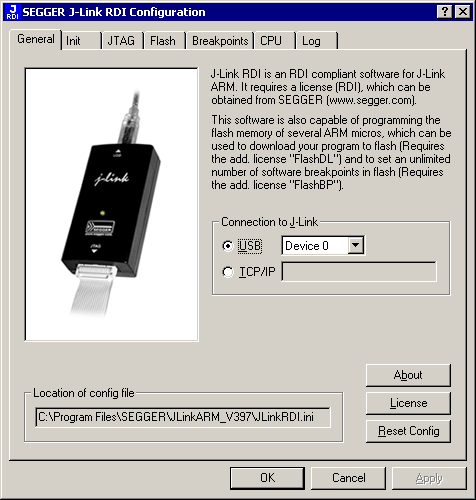
Choose RDI|Configure from the Menu and the RDI configuration
dialog box appears on your screen.
Click on the "Flash" tab. |
 |
| Step 7 |
Select your your processor and flash address.
Click on the "Breakpoints" tab. |
 |
| Step 8 |
Configure the use of breakpoints as prefered.
Click the OK button to close the RDI configuration dialog. |
 |
| Step 9 |
| Start the debugger. |
Software download

Copyright SEGGER Microcontroller GmbH & Co.KG. All
rights reserved.
For more information, please visit our web site
www.segger.com or contact us at info@segger.com
Last update:
March 12, 2008
|