10-Pin Needle Adapter
Seamless connectivity for J-Link
- 10-pin needle interface
- Direct target access
Overview

The 10-Pin Needle Adapter has been designed to connect J-Link or Flasher to a PCB which does not come with a mating connector or programming header. The designed pattern with 3 locating pins ensures that the adapter can only be connected in one way. The needle adapter allows manufacturers to save costs and space on their PCBs since there is no need to provide the PCB with additional connectors. It adapts from the standard 20-pin 0.1'' connector to a 10-pin needle connector.
Key features
- No additional connector required on your PCB
- Very small footprint
- High reliability spring pins for secure connections
- Designed with 3 locating pins, so the adapter cannot be connected the wrong way
- Please note: No external power supply required! The 10-Pin Needle Adapter comes with the option to power the target hardware via J-Link or Flasher
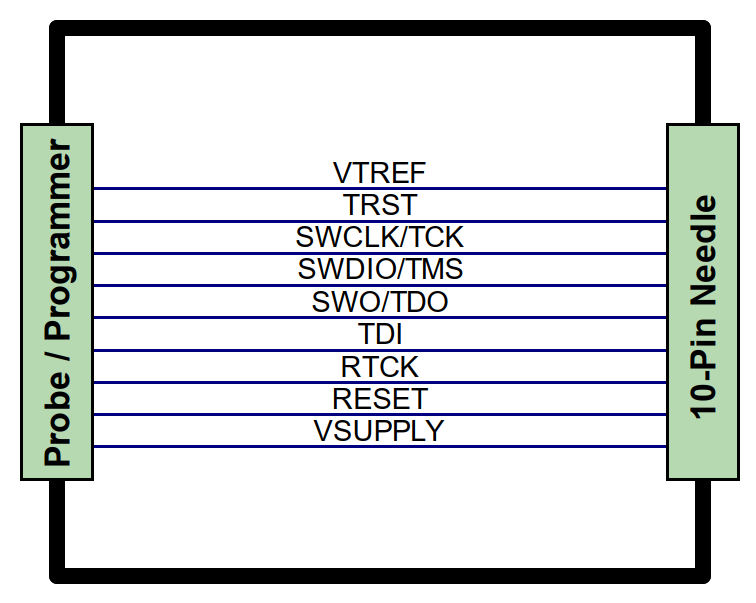
Pinout & schematics

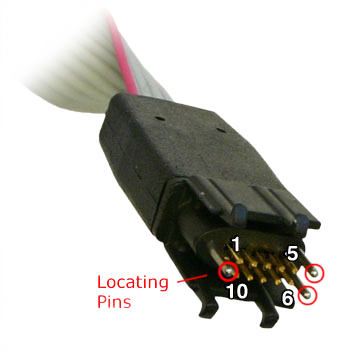
The adapter features three locating pins for precise positioning and two support legs on each side of the connector for a stable and secure connection between the pins and the PCB.

Footprint
To ensure reliable operation of the 10-Needle Adapter, we recommend implementing the footprint layout according to our specifications and following the PCB layout guidelines provided. This helps avoid common layout issues during the development process and ensures a stable connection to the flasher.
The complete footprint, including all technical specifications, dimensions, and additional information about the cable, plug, and connector, can be found in the PDF datasheet.
Get in touch with us
Have questions or need assistance? Our Embedded Experts are here to help!
Reach out to us for:
- Licensing quotes
- Technical inquiries
- Project support